Use the Perspective lens in KeyShot to simulate a physical camera lens.
Match perspective
Perspective Matching lets you interactively match the Perspective camera to the camera used to take a background image. Load a Backplate to activate Match Perspective. See Environment Settings for details.
Click Match Perspective to display a widget in the Real-Time View with 2 or 3 sets of coloured vanishing lines. The lines match the scene's coordinate system: X is blue, Z is red, and Y is green.

Two-Point Perspective
Use this mode in most cases. Adjust the vanishing lines to match the plane on which the object sits.
Three-Point Perspective
Use this mode to place a building or object when the camera is at a low or high eye level. Adjust the 3 sets of orthogonal lines to match the vanishing points of the object's plane and the vertical lines. Make sure the matched perspective uses the same up axis as the scene.
Lock Rotation
When rotation is locked, adjusting the 3 sets of lines does not change the azimuth.
Ground Grid
Turn on the ground grid to help match the perspective. The grid does not appear in rendered output.
Reset lines
Reset all sets of lines to their default position. The camera updates to match.
Turn on Show Coordinate Legend in the View menu to help identify the model's orientation in the scene. You can also press Z to turn it on or off.
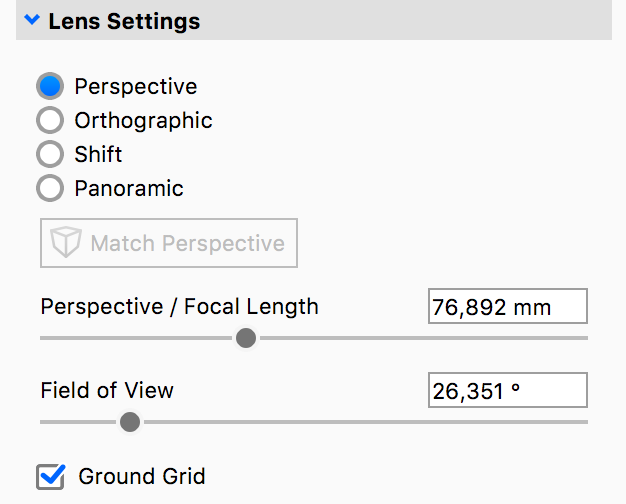
Perspective / Focal Length
Perspective / Focal Length controls the distortion (convergence) in the Real-time View. Enter real-world focal length values to replicate a camera lens.
Field of View
Field of View (FOV) controls how much you see in the Real-time View. A larger Perspective value gives you a smaller Field of View. A smaller Perspective value shows more of the scene.
Ground Grid
Ground Grid displays a 1:1 grid on the KeyShot Studio ground plane. The Environment size controls the grid density. Use the grid to match perspective and camera angles. It does not appear in rendered output.
Common focal lengths
(Source: Wikipedia)
- 14 to 21mm: Ultra-Wide lenses produce strong distortion because of their very short focal length.
- 24 to 35mm: Wide lenses show a wider field of view than standard lenses. The perspective may show some distortion.
- 50 mm: Standard lenses produce some distortion but are suitable for most uses.
- 85 mm: Portrait lenses produce less distortion than standard lenses.
- 135 mm: Telephoto lenses are commonly used to capture distant objects.
- 200 to 500 mm: Super Telephoto lenses are specialised lenses for minimal distortion.