Use Perspective Matching in KeyShot to adjust the Perspective camera to match the camera angle used to take a background image.
Load a Backplate to activate Match Perspective. See Environment Settings for details.
For best results, turn on Show Coordinate Legend under the View menu. You can also press Z to turn it on or off. The legend helps you identify the model's orientation in the scene.
How to match perspective
- Check that a backplate is present in the Real-time View.
- Open Match Perspective from the Tools section of the Ribbon.
A widget appears in the Real-Time View with 2 or 3 sets of vanishing lines. Their colours correspond to the scene's coordinate system. X is blue, Z is red, and Y is green. - Select two-point or three-point perspective to match your backplate.
- Adjust the vanishing lines to match the perspective in the image. For best results, use orthogonal lines in the backplate as guides. Move the line end points to reference points in the background image, following the coordinate layout. The camera values update as you adjust the lines. Once the lines align, pan and dolly the camera to position the object within the scene.
- Click the green check mark to keep the changes and close the tool.
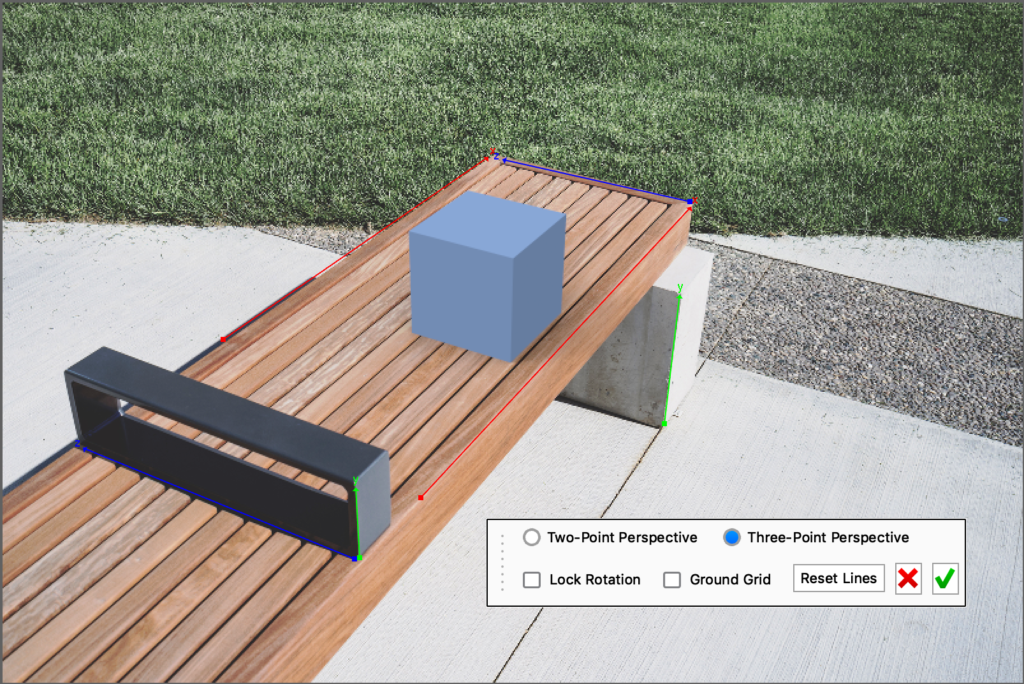
Use lines in the backplate image as guides for the vanishing lines.
Tool interface
Two-point perspective
Use this mode for most images with 2 vanishing points on the horizon and parallel vertical lines.
Adjust the vanishing lines to match the plane on which the object sits.
Three-point perspective
Use three-point perspective when placing a building or object in an image taken from a low or high eye level.
Adjust the 3 sets of orthogonal lines to match the vanishing points for the plane on which the object sits and for the vertical lines. Check that the matched perspective uses the same up axis as the scene, as shown in the coordinate legend.
Lock Rotation
When rotation is locked, adjusting any of the 3 sets of lines does not change the azimuth.
Ground Grid
Turn on the ground grid in the scene to help match the perspective. The grid does not appear in rendered output.
Reset Lines
Reset all sets of lines to their default position. The camera updates to match.
