Use SketchUp AI Render to create visuals with generative AI. You can explore ideas and create images that help explain your project.
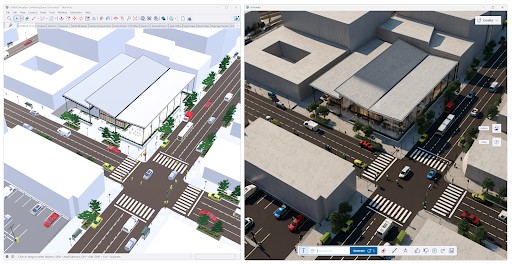
AI Render combines your active model's viewport with a text prompt or preset style to create an AI-generated image. You can:
- Generate photorealistic images quickly.
- Set the visual style of your AI-generated images.
- Control how much your text prompt influences the image.
- Mask areas of your generated image to erase, add or sketch elements.
- Use a reference image to set the style of your generated image.
- Overlay the AI-generated image on your SketchUp model to create a scene you can return to later.
- Save the AI-generated image for use outside SketchUp.
These articles explain how to use AI Render:
- Getting started with AI Render explains how to get started on your SketchUp platform.
- Using AI Render explains how AI Render works.
- Prompt engineering in AI Render explains how to use the tools and preset prompts. It also gives advice on writing prompts to get the image you want.
- Saving and sharing AI Render output explains how to save or share your images.
- AI Render Gallery explains how to find and use images saved in AI Render's Gallery.
- Technical notes explains how AI Render works behind the scenes.