SketchUp for Higher Education, Universities, and Network Labs FAQ
SketchUp higher education options for New Zealand students, educators, and institutions, including PCS purchasing and renewal help.
Last updated 17 July 2026
Plans, Products, and Eligibility
What is the difference between SketchUp for Higher Education and SketchUp for Universities?
The available SketchUp for Higher Education options are curated for higher education students and instructors providing extensive access to a suite of SketchUp products. There are multiple options available based on the needs of who is using SketchUp. Each option offers access to SketchUp’s primary product suite, but additional services, pricing, deployment, and user management options may vary:
Subscription Option | Who It’s For | Products Included | Deployment | Account Management |
|---|---|---|---|---|
SketchUp Studio for Students | Individual students | SketchUp for Higher Education (full suite) | Individual user login | Individual Account Management |
SketchUp Studio for Instructors | Individual instructors | SketchUp for Higher Education (full suite) | Individual user login | Individual Account Management |
SketchUp Studio for Universities | University/ Education Institution IT managers & administrators | SketchUp for Higher Education (full suite) | Admin managed product assignment (products can be reassigned) - users log in directly | Admin managed accounts, bulk user upload & management |
SketchUp Network Lab Licenses | University/ Education Institution IT managers & administrators | SketchUp for Desktop, LayOut | Installed on school owned computers for a lab/classroom setting. | Admin managed licenses assigned to a device, not a user. |
Who is eligible for SketchUp for Higher Education subscriptions?
Students, instructors, and administrators associated with accredited, degree-issuing institutions are eligible to use SketchUp for Higher Education subscriptions. Primary and secondary institutions and students may also qualify for the Higher Education offering.
For detailed information about which option is best for you, view PCS education licensing or contact Professional CAD Systems.
Do educators need to include SketchUp in their curriculum to qualify for a subscription of SketchUp for Higher Education?
Educators in any subject qualify. View PCS education licensing or contact Professional CAD Systems. SketchUp education offerings cannot be used for commercial purposes under the Trimble offering terms.
Which SketchUp products are included with SketchUp for Higher Education Subscriptions?
The following products are included in a SketchUp for Higher Education (student, instructor and universities options available) subscription:
- SketchUp for Desktop
- LayOut
- Sefaira
- SketchUp for Web
- SketchUp for iPad
- PreDesign
- 3D Warehouse
- Extension Warehouse
- Trimble Connect
- Scan Essentials
- SketchUp Viewer (Desktop, Mobile, Meta Quest)
- Revit Importer
Subscriptions do not include access to V-Ray for SketchUp.
Which SketchUp features are included with SketchUp Network Lab Licenses?
The following products are included in with SketchUp Network Lab Licenses:
- SketchUp for Desktop
- LayOut
- Trimble Connect
- SketchUp Viewer (Desktop, Mobile, Meta Quest)
- 3D Warehouse
- Extension Warehouse
At this time, SketchUp Network Lab licenses do not include access to SketchUp Diffusion or Add Location.
What is the difference between SketchUp for Universities and Network Lab Licensing?
SketchUp for Universities provides named-user subscription seats of the SketchUp for Higher Education product suite. These seats can be used both on and off campus, and may be reassigned as needed during a subscription term. Users log in to products using a personal Trimble ID and will have two activations available should they need to access their products on multiple devices. SketchUp for Universities is available in bulk tiered pricing.
Network Lab Licenses are floating network licenses for installation on an on-site desktop computer using an activation key. Networked Lab Licenses include access to SketchUp Pro and LayOut.
For more details on either of these options, see SketchUp for Universities .
What’s the difference between SketchUp for Universities and Authorized Training Centers?
The Authorized Training Center program supports discounted SketchUp Subscriptions for training providers who manage short-term (usually under one year) professional development offerings to professional learners.
Authorized Training Center Subscriptions are purchased and administered exclusively by the Training Provider, not the learner/student.
Pricing
How much do SketchUp for Higher Education, SketchUp for Universities, and Network Lab Licenses cost?
Each subscription type provides different offerings with pricing options based on the number of seats needed. For current pricing details, see the options listed in Plans and Pricing .
Is SketchUp free for higher education students and educators?
No. Higher education students and educators can access PCS education pricing, subject to eligibility verification.
Does SketchUp offer discounts to students?
SketchUp for Higher Education is available to students enrolled in a higher education institution. This subscription includes our premium 3D modelers, building analysis software, cloud storage, and more.
New Zealand students can purchase SketchUp for Higher Education through Professional CAD Systems. Contact PCS and provide proof of current enrolment.
Does SketchUp offer discounts to educators?
New Zealand educators can purchase SketchUp for Higher Education through Professional CAD Systems. Contact PCS and provide proof of current educator status.
Does SketchUp offer bulk licensing for institutions?
Yes. Accredited institutions can obtain bulk licensing with a SketchUp for Universities subscription. This offering includes our premium 3D modelers, building analysis software, cloud storage, and more, and serves both students and instructors. SketchUp also offers Networked Lab Licensing to support your onsite computer labs.
Account Management
How do I assign products to new users or manage existing users?
Account owners, secondary account owners, and administrators can access the Account Management Portal (AMP). Using the AMP you can add new users, assign or remove product access, or remove users. Our Account Management pages go into much more detail about using the AMP to manage the users on your account.
How do I make sure my subscription renews without disruption?
Contact Professional CAD Systems before your renewal date. SketchUp notifies subscribers ahead of time when their account is up for renewal. 30 days before renewal, use the contact information shown in the AMP or contact PCS directly to make sure your subscription continues without interruption.
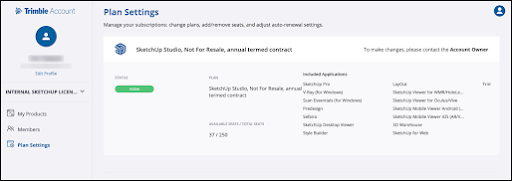
10 days before renewal, SketchUp will send a reminder email. Contact Professional CAD Systems if you need help completing the renewal.
Renewing a subscription prior to the expiration date transfers all entitlements and existing users will have uninterrupted access to their products.
Renewals performed after the expiration date will be treated as a new order. Users will need to be uploaded and assigned as if it were a brand new subscription.
For more information about renewal options, contact Professional CAD Systems.
What do I do when a user leaves midterm?
User roles and product access can be managed through the AMP by account owners, secondary account owners, or administrators. See Managing Members for more information.
Are seats purchased in the middle of a term considered a part of the original order?
Any additional subscription seats purchased after the initial order are considered a separate order and pricing will reflect this. These seats can be prorated to reflect the original order’s expiration date, or begin a new one year term. For more personalised purchasing options, contact Professional CAD Systems.
Still need help?
Technical support from our New Zealand team is available to customers with a current Procadsys SketchUp Plus subscription: Pro Plus, Pro Scan Plus, Pro Civil Contractor Plus, Advanced Workflows Plus or Studio Plus. Self-help articles are public.
Contact SketchUp support