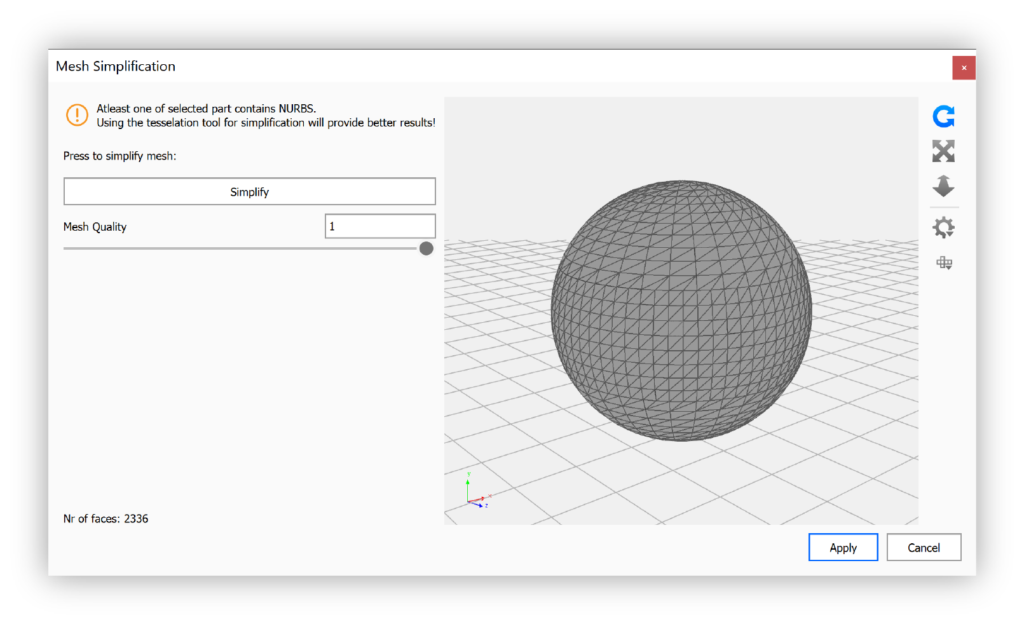
The Mesh Simplification Tool enables you to reduce the amount of triangles in a mesh, while keeping the overall shape.
Last updated 3 August 2026
The Mesh Simplification Tool enables you to reduce the amount of triangles in a mesh, while keeping the overall shape.
This can for example be useful if you need to simplify your geometry for later use in KeyVR or other AR-Applications.
How to use Mesh Simplification
Launch the Mesh Simplification tool You can launch the Mesh Simplification tool via the Tools section in the Ribbon, or via right-click on a model or part in the scene tree or Real-time View.
Adjust the Mesh quality You can adjust the quality of the mesh by using the slider.
Click Simplify By clicking the Simplify button your changes will be shown in the preview.
Apply or Cancel To finalize the changes to the scene and close the dialog, click Apply. Cancel will revert all changes and exit the dialog.
Merge Parts
Merge Parts is a functionality that allows you to merge multiple parts with identical materials into one. This, like the mesh simplification, can help reduce the size of your scene. Smaller scene sizes can be beneficial when uploading scenes to the Web Viewer or in AR-Applications.
 Mesh Simplification Tool enables you to reduce the amount of triangles in a mesh, while keeping the overall shape.